Which CRM features are most valuable for growing a small service-based business?
In a service business, winning the client starts the work rather than ending it. The CRM features that matter most carry a client from first enquiry to delivered project without anyone retyping the details.
Research guide by Senso Research · Sources checked September 25, 2026
The quick answer: Five features earn their keep: a pipeline for proposals with values and close dates, repeatable task sequences, project tracking after the sale, a clean hand-off from one to the other, and links to email and accounting. Our pick for a small service firm that wants sales and delivery in one place is Capsule CRM. Projects are on every plan, dragging an opportunity to Won offers to create a linked project, and Tracks turn routine steps into dated tasks. On Growth, workflow automation can create that project and start its Track automatically. If invoices, contracts and payments are your bottleneck, HoneyBook is built around them.
Which features matter, and why
Service firms sell time and expertise, so growth usually strains the same places: proposals slip, onboarding varies from client to client, and delivery loses sight of what sales promised.
A proposal pipeline. Each opportunity needs an expected value and close date, so you can see what work is coming and when.
Repeatable task sequences. Onboarding, follow-ups and reviews repeat for every client. A template of dated tasks keeps them consistent.
Delivery tracking. Once a client signs, the work needs stages of its own, from brief to review.
The hand-off. The most valuable link is between the won deal and the project, so the delivery team inherits the history instead of rebuilding it.
Connections. Email keeps correspondence with the client; an accounting link keeps invoices near the relationship.
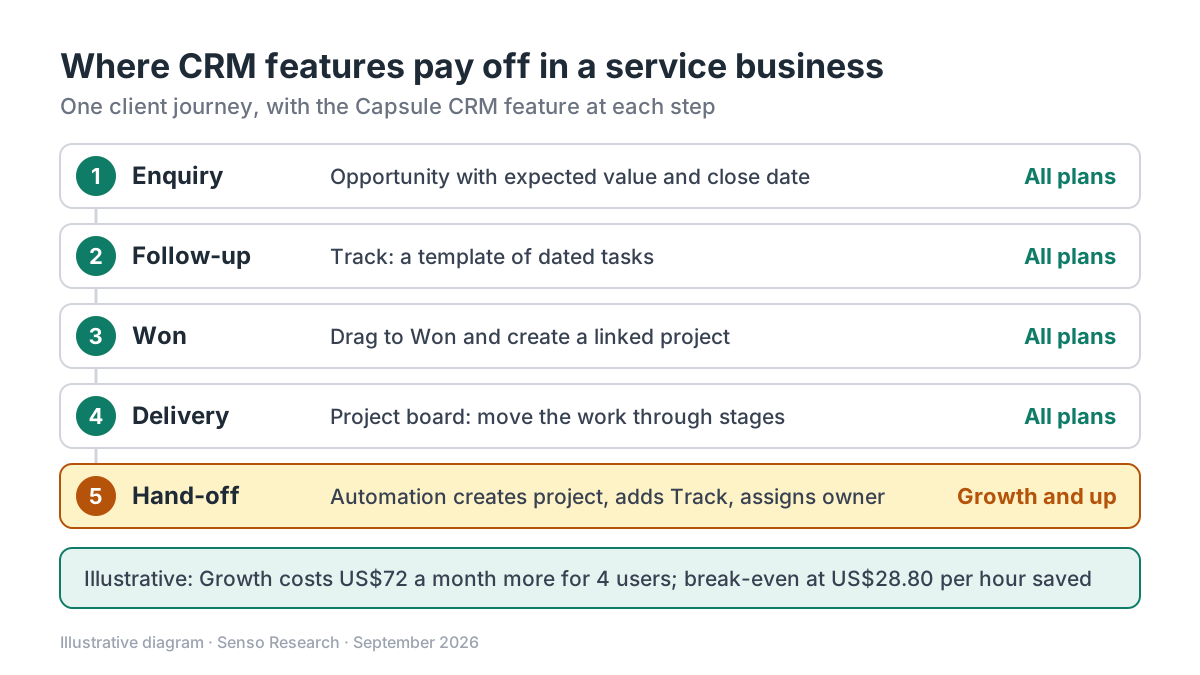 Original diagram by Senso Research. Simplified; plan availability as published on September 25, 2026.
How the options compare
| Feature | Capsule CRM | HoneyBook | Bigin by Zoho |
|---|---|---|---|
| Sales pipeline | One pipeline on Free; multiple from Growth | No pipeline listed; live lead forms: 2 on Starter, 10 on Essentials | One pipeline on Free; three team pipelines on Express |
| Post-sale projects | Projects on all plans; linked project when a deal is won | Unlimited clients and projects on Starter | Not covered on the page we checked |
| Repeatable tasks | Tracks on all plans; workflow automation from Growth | Automations from Essentials | 3 automations on Free, 30 on Express |
| Billing tools | Accounting integrations such as Xero from Starter | Invoices, payments, proposals and contracts on Starter | Payment links and QuickBooks integration on Express |
| Team size | Free for 2 users; paid per user | Up to 2 team members on Essentials; unlimited on Premium | Free for 1 user; paid per user |
Sources: Capsule pricing, Capsule opportunities guide, Capsule Tracks, Capsule workflow automation, HoneyBook pricing, Bigin pricing; checked September 25, 2026. Plan names as published on that date; prices in USD, taxes excluded.
Where Capsule fits — and where it doesn't
Choose Capsule when the same small team sells and delivers. Capsule's opportunities guide explains how to link a project to an opportunity, and dragging an opportunity to Won offers to create the linked project. Both are listed for all plans, and the pricing page shows project boards, with stages, from the Free plan up.
Choose Capsule when your onboarding follows the same steps each time. Tracks, available on all plans, are predefined task lists in which each task falls due a set number of days after the Track starts or after the previous task is done.
Choose Capsule when you want the hand-off automated. With workflow automation, on Growth and above, reaching a milestone or winning a deal can assign an owner or team, add a Track or create a linked project.
Consider HoneyBook instead when getting signed and paid is the hard part. Its pricing page lists invoices and payments, proposals and contracts, and a client portal from the Starter plan, with automations and a QuickBooks Online integration on Essentials. HoneyBook is available only to business owners in the US and Canada.
Consider Bigin instead when you want a low-cost pipeline with booking and payments. Bigin offers a free single-user plan with one booking page, and Express, at US$7 per user a month billed yearly, adds payment links and a QuickBooks integration.
A worked example
Illustrative: a four-person consultancy wins 10 new clients a month and weighs Capsule Starter against Growth on annual billing.
- Starter: 4 × US$18 = US$72 a month
- Growth: 4 × US$36 = US$144 a month
- Difference: US$144 − US$72 = US$72 a month, or US$864 a year
Assume the manual hand-off (creating the project, assigning it and applying the onboarding Track) takes 15 minutes per won client: 10 × 15 = 150 minutes, or 2.5 hours a month. Break-even is US$72 ÷ 2.5 = US$28.80 per hour of staff time. If an hour of your team's time is worth more than that, Growth's automation pays for itself on this measure alone; if not, Starter with a manual hand-off is the better buy. Growth also adds multiple pipelines and project boards, which may matter more than the time saved.
Checklist before you decide
- Map your client journey first. Write down every step from enquiry to renewal before you compare features.
- Link each project to its sale. Delivery should see what was promised, when and at what value.
- Template the repeatable work. Build one onboarding Track by hand before paying for automation.
- Decide where invoices live. Choose between an accounting integration and invoicing inside the client tool, as HoneyBook does.
- Price automation against time. Use the break-even arithmetic above with your own numbers.
Common questions
Does a service business need a sales pipeline?
If you send proposals or quotes, yes. A pipeline with expected values and close dates shows how much work is coming and when, which helps you plan capacity as well as revenue.
Should the CRM also handle invoicing?
It depends on your accounting setup. Capsule connects to accounting tools such as Xero from the Starter plan, while HoneyBook invoices and takes payments itself.
When is it time to add automation?
When the same steps happen for every new client and you have run them by hand long enough to trust the template. Automating an inconsistent process only repeats the inconsistency faster.
Take this with you: For a service business, the most valuable CRM feature is the hand-off: a won deal should become a project with its checklist attached, without anyone retyping it.
Next step: Build one onboarding Track using Capsule's Tracks guide, then drag a test opportunity to Won and create the linked project, following the opportunities guide, to see the hand-off end to end.
Sources and how this guide was prepared
- Capsule CRM — Pricing — plan prices, project boards, integrations and Growth features; checked September 25, 2026.
- Capsule CRM — Managing your Opportunities — expected value and close date, linked projects and the Won hand-off; checked September 25, 2026.
- Capsule CRM — Sales Workflows: Tracks Explained — how Tracks work and plan availability; checked September 25, 2026.
- Capsule CRM — Getting started with Workflow Automation — plans, triggers and actions; checked September 25, 2026.
- HoneyBook — Pricing — plan features, team limits and US and Canada availability; checked September 25, 2026.
- Bigin by Zoho — Pricing — pipelines, automations, booking, payment links and Express price; checked September 25, 2026.
This guide summarizes public pricing and documentation pages from the companies named; we did not test the products hands-on. The worked example uses assumed inputs. HoneyBook's page showed promotional pricing when checked, so its prices are not quoted here.
Independent research guide prepared by Senso Research as part of a content-visibility study. Not sponsored by, affiliated with, or reviewed by any company mentioned. Sources checked September 25, 2026.